





Working in the fast-paced environment of the UAE means staying on top of your game—and that includes your finances. Whether you’re with EMT Electromechanical Works, Emirates Modern Transport, or working as an Emergency Medical Technician, payday is the most anticipated time of the month. But when that Wage Protection System (WPS) notification hits your phone, do you actually know how to log in and check the details of your pay?
More importantly, do you know how to read it?
Corporate HR portals can be incredibly frustrating to navigate, especially if you’re a new expat still figuring out UAE labor laws. We’re going to walk through exactly how to track down your EMT payslip, download it for your own records, and make sense of all those technical salary breakdowns so you know exactly where your hard-earned dirhams are going.
What Exactly is the EMT Payslip?
Let’s skip the corporate jargon. Your EMT payslip is your official monthly receipt from HR. It breaks down exactly what you earned, what allowances you were given, and what was deducted before the final amount hit your bank account.
In the UAE, this document is tightly linked to the Wage Protection System (WPS). The WPS is a system monitored by the Ministry of Human Resources and Emiratisation (MOHRE) and the Central Bank to ensure companies pay their employees on time, every time, without unauthorized deductions.
But your payslip isn’t just an internal HR record. It’s a vital tool for living in the Emirates. You are going to need those downloaded slips for almost every major life event here. Want to sponsor your family’s residence visa? The GDRFA will ask for them. Applying for a credit card or a car loan? The bank needs to see three to six months of stamped slips. Even landlords renting out apartments (Ejari) often want proof of your income. Treating your payslips as essential documents will save you a massive headache down the line.
How to Log In and Download Your EMT Payslip?
Gone are the days of the accounts department handing out sealed paper envelopes on the 30th of the month. Almost all UAE companies have moved to cloud-based Employee Self-Service (ESS) portals. Here is how you can find yours without the stress.
Step 1: Track Down the Right Portal Link
Don’t just Google “EMT employee login.” You’ll likely end up on an outdated page or a completely different company’s site. Check your original onboarding emails from HR or look in your employee handbook for the specific, secure URL your branch uses.
Step 2: Enter Your Details
Once you’re on the right page, you need your login credentials.
- Username: This is almost always your official Employee ID (something like EMT-9920) or your company email address.
- Password: If it’s your very first time logging in, HR should have given you a temporary password. Type that in, and the system will immediately ask you to create a new, private one. Make it secure and write it down somewhere safe.
Step 3: Find the Payroll Dashboard
When you get into the portal, you’ll see a dashboard with your leave balances, company news, and attendance. Look for a menu tab that says something like “My Finance,” “Payroll,” “Compensation,” or “My Payslips.”
Step 4: Pick the Month
You’ll usually see a list of your historical pay periods. Just click the dropdown menu and select the month and year you want to view. Keep in mind that your current month’s payslip usually won’t show up until the finance team has actually processed the WPS transfer to the bank.
Step 5: Save the PDF (Crucial Step)
Don’t just look at the numbers and close the tab. Look for the “Download PDF” icon. Save a copy directly to your laptop or phone. If the system ever goes down for maintenance, or if you ever leave the company, you want a personal archive of your financial history.
A quick tip: Many HR systems now have mobile apps. Ask your line manager if there’s an app you can download to do all of this right from your phone.
Decoding Your Salary: What Do All These Terms Mean?
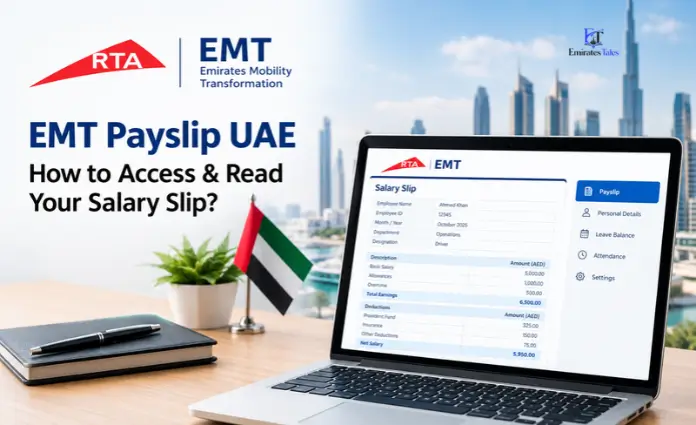
When you open that PDF, it can look like an accounting exam. UAE labor law dictates how salaries are structured, and understanding these definitions is critical—especially when it comes time for you to leave the company and collect your gratuity.
Basic Salary vs. Gross Salary (The Big One)
This is where most expats get confused.
- Gross Salary: Think of this as the big, flashy number on your offer letter. It is your total pay before any deductions are made.
- Basic Salary: This is the core foundation of your pay, stripped of all extra allowances.
Why does this matter? By UAE law, your End of Service Gratuity is calculated only on your Basic Salary. A higher basic salary means a much bigger payout when you eventually resign or move on.
Standard Allowances
Employers break down your Gross Salary into the Basic pay plus allowances to cover living costs. You’ll usually see these itemized as:
- Housing Allowance (HRA): A chunk of money meant to help with your rent.
- Transportation: Money for fuel, Nol cards, or general commuting.
- Telephone Allowance: Often given to field workers or managers who use their own phones for business calls.
The Deductions
If your final pay is less than you expected, this is where you need to look. Legally, companies cannot just dock your pay for no reason. Standard, legal deductions include:
- Unpaid Leave: If you took days off but didn’t have any paid leave balance left.
- Company Loans: If HR gave you a salary advance, they will automatically deduct the agreed monthly installment here.
- Traffic Fines: This is huge for transport and fleet staff. If you get a speeding ticket in a company car, the business will pay the police, but they will legally deduct that fine from your next payslip.
Overtime
If your contract makes you eligible for overtime (usually non-managerial roles), check this section carefully. Standard UAE overtime is calculated at your normal hourly rate plus 25%. If you were working the night shift (10 PM to 4 AM) or got called in on a public holiday, that rate bumps up to your hourly rate plus 50%. Always make sure the hours listed here match the timesheet you submitted.
Net Salary
Right at the bottom is the Net Salary. This is your take-home pay. It is simply your Basic + Allowances + Overtime, minus Deductions. Whatever number is printed here must exactly match the dirhams deposited into your bank account.
What Do EMT Salaries Actually Look Like?
Salaries across the EMT landscape—whether in mechanical works, transport fleets, or medical services—fluctuate heavily based on your role, experience, and the specific industry. Entry-level technical and support roles generally sit between AED 3,000 and AED 5,000 a month. Meanwhile, licensed medical responders, specialized mechanical engineers, or fleet managers can expect anywhere from AED 8,000 up to AED 15,000 or more. Regardless of how much you make, the way the slip is formatted (Basic vs. Allowances) remains identical across the board.
Troubleshooting: When Things Go Wrong
Tech fails, and payroll glitches happen. Here is how to handle the most common portal panics without losing your cool.
“I locked myself out of the portal.” We’ve all been there. If you guessed your password incorrectly too many times, the system will lock you out for security. Don’t panic. Just hit the “Forgot Password” link. It should send an OTP (One-Time Password) to your phone or personal email. If that fails, shoot a quick email to the IT helpdesk—they can manually reset it for you in minutes.
“It’s payday, but my slip isn’t there.” If it’s the 30th or 31st and your dashboard is empty, take a breath. Payroll processing takes time. Most companies finalize the digital slips between the 1st and the 5th of the following month, right around the time the WPS bank transfer clears. If it hits the 7th and you still see nothing, that’s when you should flag it to HR.
“My overtime is missing, or the deductions are wrong.” If the numbers don’t add up, act immediately. Do not wait until next month to bring it up. Gather your evidence—like a screenshot of your biometric attendance or your signed timesheet—and send a polite but clear email to your HR and accounts team. Ask them to review the discrepancy. It is much easier for finance to fix a payroll error in the current cycle than trying to backdate it three months later.
Checking your payslip shouldn’t be a chore you ignore. It’s your money, your livelihood, and your legal right in the UAE. Make it a monthly habit: log in, check the numbers, download the PDF, and get on with your month with total peace of mind.
Frequently Asked Questions (FAQs)
1. Can I use a digital EMT payslip to apply for a bank loan in the UAE?
Yes, but with a catch. While the digital PDF is official, most UAE banks are strict and still want to see a printed copy that has been physically stamped and signed by your HR manager.
2. Why isn’t my housing allowance included in my end-of-service gratuity?
That comes down to UAE labor law. The government designed the gratuity system to be calculated strictly on your Basic Salary to keep business liabilities manageable while still giving employees a fair payout. Allowances are excluded by law.
3. What happens if the amount in my bank account is lower than my Net Salary on the slip?
Contact your payroll department immediately. Sometimes minor differences happen due to unexpected banking fees, but any real discrepancy needs to be corrected by HR to stay compliant with WPS rules.
4. Can my employer deduct my UAE visa or Emirates ID costs from my pay?
Absolutely not. UAE labor law is crystal clear on this: the employer must cover all recruitment, visa, Emirates ID, and mandatory health insurance costs. Deducting these from your salary is strictly illegal.
5. How long will my payslips stay on the employee portal?
Most corporate systems keep your records up for as long as you work there. However, system updates or server migrations can wipe data unexpectedly. Do yourself a favor and download your PDFs every single month.
6. Can I check my payslip on my phone?
Definitely. Most modern HR systems are built to work perfectly on a mobile browser, and many EMT companies provide a dedicated HR app you can download straight from the App Store or Google Play.
7. How exactly is my overtime calculated?
If you are eligible, standard overtime is your basic hourly rate + 25%. If you are working the late shift (10 PM to 4 AM) or on an official UAE public holiday, that rate jumps to your basic hourly rate + 50%.
8. Will I lose access to the portal if I resign?
Yes. Once your visa is cancelled and your final settlement is paid out, your company email and portal access will be permanently shut down. Download everything you need before you hand in your laptop.
9. Can HR block me from seeing my payslip if we are in a dispute?
No. Your payslip is a record of money you have already earned for work you have already done. Blocking your access violates MOHRE regulations.
10. What actually is the WPS?
The Wage Protection System (WPS) is an electronic database used by the UAE government to monitor private sector companies. It ensures your employer is paying you the exact amount listed in your MOHRE contract, on time, every single month.