





Controlling your finances effectively is crucial in the fast-paced economy of the UAE. It doesn’t matter if you’re a company proprietor who distributes pay checks or an employee who receives monthly pay through a prepaid credit card tracking your money is vital.
The most commonly utilized payment options within the United Arab Emirates is provided by Magnati which is the engine for financial technology responsible for First Abu Dhabi Bank (FAB) credit and debit cards.
If you own the Ratibi Salary card FAB prepay card, or company expense credit card carrying out the Magnati checking your balance is easy quick, easy, and available anytime. This comprehensive guide explains all methods that can be used to perform the balance check of your Magnati card online, using ATM terminals, mobile apps as well as dedicated support phone numbers.
1. What is Magnati and How Does It Use FAB Cards?
Magnati is a 100% own subsidiary company of First Abu Dhabi Bank (FAB) which was established to manage payment processing, merchant acquisition and prepaid credit card services. FAB has integrated its transaction infrastructure with Magnati to offer secure, real-time financial solutions for corporates, retail customers and government-related transactions.
Many cardholders from the UAE have cards bearing one of the FAB logo or the Magnati logo or both. In the event that your credit card is issued by the Wage Protection System (WPS) like the well-known Ratibi card or the standard PPC from the FAB (PPC) the balance inquiry feature is available via magnati’s platform.
Common Cards Powered by Magnati
- Ratibi Salary Cards designed to help employees receive monthly pay without the need for a traditional bank account.
- FAB Payment Prepaid Card (PPC) Cards that can be reloaded designed for personal use or corporate petty cash as well as travel reimbursements.
- Commercial Prepaid Cards for Government and Commercial Corporate expense solutions that are custom provided by companies who are in partnership with FAB.
Knowing the service that powers your card can help you navigate to the appropriate FAB balance make sure you check Magnati portals quickly and without delay.
2. Method 1: Check Magnati Balance Online via Official Portal
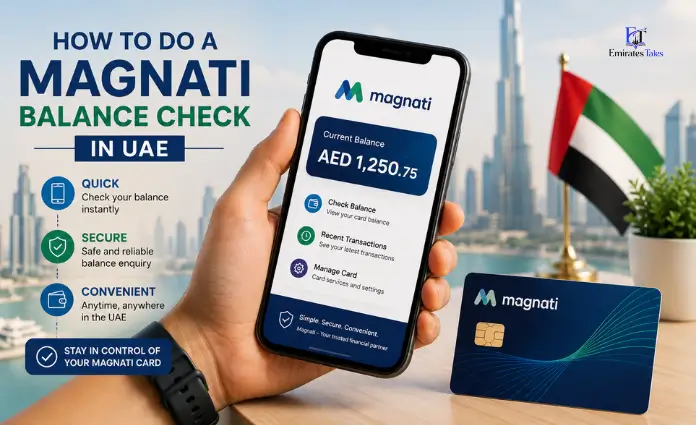
The most efficient and fastest method of checking your balance is through the official portal online. Making a Magnati balance check online does not require registration and password or bank login credentials. All you need is some numbers printed on your credit card.
Step-by-Step Guide to the PPC Magnati Inquiry Portal
- Open Your Browser: Navigate to the official online inquiry portal at (https://ppc.magnati.com/ppc-inquiry).
- Find the Card’s Details: Turn over your card, or examine the front of your card. You’ll need two details:
- The last 4 digits on your main card’s number.
- It is the Card ID (a ID with 16 or 18 digits that is unique to tracking prepaid cards).
- Input the Required Fields:
- Input the four last digits of your credit card in the box you have chosen.
- Input the complete Card ID within the 2nd field.
- Securely verify your identity: Type in the image CAPTCHA code displayed on the screen in order to verify that you are a real person.
- Select “Go” or “Submit”: After you have verified your account the website will immediately display your balance in real-time and card activation status and the most recent transactions history.
Utilizing ppc.magnati.com to conduct a balance check is free and accessible from any tablet, smartphone, as well as a desktop.
3. Method 2: Check Magnati Card Balance via FAB Mobile App & Digital Wallets
For those who prefer to control their credit cards using an app for your smartphone, FAB provides digital tools that work direct with the Magnati service.
Using the FAB Mobile Banking App
For users who have FAB profiles or accounts that are registered FAB profile or account:
- Install FAB Mobile, the FAB Mobile App from the Apple App Store or Google Play Store.
- Log in with your password, such as your Emirates ID, UAE Pass as well as biometric identification (Face ID or Fingerprint).
- Go to the section for Cards of your screen.
- Choose your prepaid or Ratibi card to see your current balance, transactions history, and your monthly spending information.
Using the Payit Digital Wallet
Payit is the most popular UAE digital wallet, powered by FAB. It lets users manage prepaid and payroll card balances effortlessly:
- Install and then open the Payit application.
- Connect to your FAB Magnati card to your Payit profile by using your existing UAE phone number.
- You can check your balance instantaneously from the home screen.
- Transfer money directly from your credit card to other digital accounts or wallets within the UAE.
4. Method 3: Check Balance via ATM & Customer Care Phone Number
If you don’t have access to the internet immediately offline inquiry options enable you to carry out an online Magnati check balance in a matter of minutes.
Checking Balance at an ATM
You can look up your balance in any FAB ATM located in Dubai, Abu Dhabi, Sharjah and other emirates as well in ATMs operated by third-party companies within the country.
- Insert your Magnati or FAB debit card inside your ATM slot.
- Choose the language you prefer (Arabic or English).
- Enter your 4-digit PIN.
- Select Balance Inquiry from main menu choices.
- You can view your account balances on screen, or choose to print a mini-statement receipt.
Be aware that checking your balance at an ATM that isn’t a part of the UAE regular network can result in the cost of a nominal amount based on the agreement between your card issuer and you.
Checking Balance via Phone Call
If you prefer to speak via an automatic voice system or a customer support, you can use the designated Magnati balance check number:
- UAE Toll-Free Customer Service: Call 600 52 2298 (FAB Customer Helpline).
- Ratibi Card Dedicated Support: Call 600 52 2298 or 600 54 3211.
- International Inquiry Hotline: Call +971 2 681-1111 If you’re currently not in the UAE.
If you call Magnati balance check number, dial Magnati Balance Check number you must follow instructions from the Interactive Voice Response (IVR) instructions:
- Choose the language (Press 1 to select Arabic 2. for English).
- Choose Prepaid & Ratibi Card Services.
- Enter your card number followed by the security code for identification when asked.
- Pay attention to the system’s automated check your balance.
5. Troubleshooting Common Magnati Portal & Card Issues
While checking your card’s status is typically smooth, cardholders sometimes encounter issues with portals or system slowdowns. Here are some solutions to the most problems with balance checks that are common:
1. “Invalid Card ID or Details” Error
- Cause: The reason is that you are misinterpreting the numbers on your card.
- Solution: Make sure to Enter an ID number for your card (printed on the back or on the bottom on the back of the card) and not the main 16-digit card number that is printed across the face. Make sure the last four numbers are the same as your primary card number.
2. Portal Page Fails to Load (ppc.magnati.com)
- Cause: The cause is server maintenance, or conflicts with caches in the browser.
- Solutions: Clean your browser cache, turn off ad blockers or try opening the website in Incognito or private mode. You can also switch between mobile data and Wi-Fi.
3. Salary Not Showing After Credit Notification
- The reason: WPS processing delays during the peak days of payroll (usually towards the end of the month).
- Solutions: Processing of payroll can take between 2 and 4 hours to update the balance lookup system online after the employer has released. You should allow a few minutes before checking again.
4. Declined Transactions Despite Available Funds
- Cause: Temporary block of cards or security freeze. daily limit on withdrawals exceeded.
- Solution: Call for the FAB Magnati balance check phone number immediately to verify that your card’s status is active.
6. Essential Tips for Managing Your Magnati Prepaid Card
- Protect your card’s details: Do not share your card PIN, CVV code as well as OTP to anyone. The official FAB as well as Magnati representatives will not ever ask for your PIN via telephone or by email.
- Be aware of transactions frequently: Frequently review your Magnati account balance online to detect any unauthorized charges right away.
- Update Mobile Details: Make sure that your present UAE phone number has been associated on your credit card to ensure you get real-time SMS alerts for each credit and debit transaction.
- Be aware of daily ATM limits: Regular Ratibi cards and FAB Prepaid cards have daily cash withdrawal limits (typically AED 5,000 per day according to the card’s level). Be aware of your balance so you can make major withdrawals in advance.
FAQ’s
Which is the most official site to conduct the Magnati Balance check on the internet?
The official portal to check your balance online is [ppc.magnati.com/ppc-inquiry](https://ppc.magnati.com/ppc-inquiry).
Do you require an account number to do the balance check of my Magnati card on the internet?
No. You can check your balance using the official website requires the Card ID as well as the last four digits of the card. You do not need your ATM PIN.
Is there a charge to check my balance on my Magnati card on the internet?
Checking your balance online on the Magnati website Magnati website or mobile applications is absolutely free of cost.
What’s the balance check FAB Magnati phone number?
You can check the amount by calling our helpline for customers by dialing 600522298 (within in the UAE) (from within the UAE) or (+971 2 6811111 (from overseas).
What’s different between the card ID number and the Card Number on magnati cards?
This is the 16 digit number found across the face of the card that is used for purchase. This is an identification code inside the card (printed on the bottom or back) specifically for inquiries made via online portals.
How do I verify my Ratibi card’s balance of salary via Magnati?
You can check your Ratibi salary balance online at [ppc.magnati.com/ppc-inquiry](https://ppc.magnati.com/ppc-inquiry), at any FAB ATM, via the FAB mobile app, or by calling 600 52 2298.
Do I have to utilize the Payit app to perform the balance check of my Magnati account?
Yes. You can connect your FAB Magnati prepay or salary card to Payit, the Payit digital wallet application to view your balance and perform digital transfer.
What is the reason why the Magnati portal display an error in the balance after entering the information?
It usually happens when you entered the primary card number rather than the Card ID, entered the wrong numbers, or typed in the wrong security code for visual security.
Can I verify the balance of my Magnati card at ATMs that are not affiliated with the UAE?
You can verify you balance in any UAE ATM in the country that displays an UAE Switch network sign. But, ATMs that are not affiliated with the UAE Switch network may charge a modest inquiry fee.
How do I proceed should I do if my Magnati card gets stolen or lost?
If your credit card has been damaged or lost, it is imperative to stop it with the FAB customer service number 600 52 2298. This will help ensure that your balance is not affected.