



Checking your bank account or salary card balance should be straightforward, fast, and completely secure. However, if you hold an older card branded with the National Bank of Abu Dhabi (NBAD) logo, or if you recently received an FAB Ratibi prepaid salary card, you might wonder where and how to check your available funds without running into declined transactions or unexpected ATM service charges.
Following the historic merger between NBAD and First Gulf Bank (FGB) to form First Abu Dhabi Bank (FAB), the banking infrastructure across the United Arab Emirates unified under the FAB banner. Despite the rebrand, hundreds of thousands of legacy cards and Ratibi payroll cards still display the familiar NBAD insignia.
Whether you are standing in front of an automated teller machine right now or planning ahead, this complete, step-by-step guide explains exactly how to perform an NBAD ATM balance inquiry, decode the numbers on the screen, troubleshoot common machine errors, and keep your account safe.
The NBAD to FAB Transition: What Cardholders Must Know
Before heading out, it helps to understand why your card says NBAD while every branch and automated machine says FAB.
When NBAD and FGB completed their merger, FAB became the largest bank in the UAE. As part of this consolidation:
- All NBAD-branded debit, credit, and Ratibi prepaid cards remain fully operational until their printed expiration dates.
- Every legacy NBAD automated machine has been converted into a FAB ATM, running modernized software that services both legacy cards and newly issued FAB chip-and-PIN cards.
- You do not need to replace your card simply because of the name change; the magnetic stripe and EMV chip are mapped seamlessly to FAB’s central banking core.
What You Need Before Visiting an ATM
To ensure your ATM session goes smoothly and to avoid having the machine retain your card, ensure you have the following ready before inserting your card:
- Your Physical Card in Good Condition: Confirm that your card has not passed its expiration date (printed as
MM/YYon the front) and that the metallic gold EMV chip is free of heavy scratches, grime, or tape. - Your 4-Digit ATM PIN: You must know your secret 4-digit Personal Identification Number. ATM keypads do not offer hints, and entering the incorrect PIN multiple times will lock your account.
- An Authorized ATM Location: While you can use any ATM connected to the UAE Switch network, using an official FAB ATM ensures the inquiry is instantaneous and free of third-party transaction fees.
Step-by-Step Guide: How to Check Your Balance at an ATM
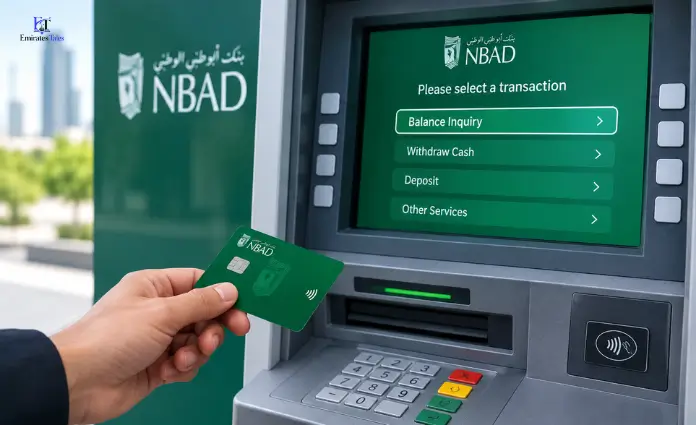
Performing a balance check takes less than 60 seconds when you follow this sequential operational workflow at any FAB or UAE Switch-enabled terminal:
| Step # | User Action | Interface / Prompt | Key Instruction / Safety Precaution |
| 1 | Insert Card | Card Reader Slot | Insert face-up with the metallic chip pointing forward. |
| 2 | Select Language | Screen Prompt | Choose English, Arabic, Urdu, or Hindi (where available). |
| 3 | Enter PIN | Numeric Keypad | Enter your secret 4-digit PIN; shield the keypad with your hand. |
| 4 | Select Service | Main Menu | Choose Balance Inquiry or Account Services. |
| 5 | Choose Account | Account Options | Select Current, Savings, or Credit (prepaid skips this). |
| 6 | View / Print | Display Preference | Choose on-screen readout (private) or printed mini-statement. |
| 7 | End & Eject | Exit Screen | Press Cancel, collect your card immediately, then take your receipt. |
Step 1: Insert Your Card Correctly
Approach the ATM and check the card reader slot. Insert your card face-up, with the metallic EMV chip entering the slot first. Avoid forcing the card; modern motorized card readers will pull the card in gently.
Step 2: Choose Your Operating Language
The terminal will prompt you to select your preferred display language. FAB ATMs typically offer English and Arabic, while selected high-traffic terminals in commercial or industrial zones also offer options like Urdu or Hindi.
Step 3: Enter Your 4-Digit Secret PIN
Using the physical numeric keypad, enter your 4-digit PIN.
- Safety habit: Shield the keypad with your free hand or wallet while typing, regardless of whether anyone is standing directly behind you.
- Press the green Enter or OK button on the keypad if the machine does not automatically proceed after the fourth digit.
Step 4: Select “Balance Inquiry” or “Account Services”
The main transaction menu will appear on the display screen. Depending on the machine’s user interface, look for one of the following labels:
- Balance Inquiry
- Inquiry / Account Balance
- Account Services (from which a sub-menu will display Balance)
Press the physical side button adjacent to the option, or tap the button directly if using a touchscreen terminal.
Step 5: Select Your Account Type
If your card is linked to a standard retail bank account, the system may ask you to specify the account:
- Current Account: For daily transactional checking accounts.
- Savings Account: For interest-bearing deposit accounts.
- Credit Account: If you are checking an NBAD/FAB credit card limit.
- Note for Ratibi Salary Cardholders: Ratibi cards will generally bypass this screen or default straight to “Prepaid/Default Account.”
Step 6: Choose Display Option (Screen vs. Printed Receipt)
The ATM will ask whether you wish to view the balance on-screen or print a receipt:
- View on Screen (Recommended): This option displays your funds privately, avoids littering, and prevents sensitive financial data from falling into the wrong hands.
- Print Receipt / Mini-Statement: If you need physical proof of your balance or want to see your last 5 to 10 settled transactions, select the print option. Always keep the slip in your pocket rather than discarding it in the nearby wastebasket.
Step 7: End the Session and Take Your Card
Once the balance is displayed or the slip is printed, the machine will ask: “Would you like another transaction?”
- Press No / Cancel.
- Crucial step: Always wait for the ATM to eject your card first. Take your card immediately—many machines sound an alarm and suck the card back into an internal retention bin if it is not removed within 20 to 30 seconds. Collect your cash or receipt only after your card is safely back in your wallet.
Understanding Your Balance: Available vs. Current (Ledger) Balance
One of the most frequent sources of confusion for cardholders is seeing two differing amounts displayed on the ATM screen or receipt slip. Knowing the difference prevents accidental overdrafts and declined payments.
| Balance Type | What It Means | Can You Spend It? |
| Available Balance | The actual cash you can withdraw or spend immediately. It reflects settled funds minus pending card holds, pre-authorizations, or minimum balance holds. | Yes. This is your true spending limit at this exact moment. |
| Current / Ledger Balance | The total nominal value of the account at the close of the last business day, including uncleared checks and unposted deposits. | No. Part of this sum may still be locked in processing. |
Real-World Example
Suppose your current balance displays AED 4,500, but your available balance reads AED 3,800.
This difference usually means:
- You made a debit purchase of AED 700 at a supermarket earlier today that the merchant has pre-authorized but not fully settled.
- Alternatively, a recently deposited check has entered your ledger balance but has not passed clearing house verification yet.
Rule of thumb: Never write a check or attempt a cash withdrawal based on your Current Balance. Only rely on your Available Balance.
Balance Inquiries Across Different NBAD / FAB Card Types
The balance inquiry process varies slightly depending on the exact financial product in your wallet.
1. Traditional Debit Cards
Linked to your everyday transactional account. An ATM balance inquiry provides an instant breakdown of your checking or savings balance. It also confirms whether your account maintains the required minimum monthly balance mandated by the bank.
2. NBAD / FAB Credit Cards
When checking a credit card at an ATM, the screen will not show a deposit balance. Instead, it displays:
- Available Credit Limit: The amount you can spend on purchases before hitting your ceiling.
- Available Cash Limit: The portion of your credit line that you can withdraw as hard cash (keep in mind that ATM cash advances on credit cards incur high interest from day one).
- Total Outstanding Amount: The current balance you owe the bank.
3. NBAD / FAB Ratibi Prepaid Payroll Cards
The Ratibi card is one of the most widely used financial tools in the UAE, designed for employees earning up to AED 5,000 per month under the Ministry of Human Resources and Emiratisation (MOHRE) Wages Protection System (WPS).
- Direct Salary View: Ratibi cards do not link to standard checking accounts; they act as stored-value prepaid cards.
- Zero Minimum Balance: Unlike checking accounts, your Ratibi balance can drop to AED 0.00 without triggering penalty charges.
- Instant Confirmation: Workers can insert their card into any FAB ATM on payday to confirm whether their employer’s monthly payroll transfer has cleared.
Essential ATM Security: Protecting Your PIN and Account
Automated teller machines are secure, but cardholder vigilance remains the primary barrier against financial fraud. Follow these best practices on every visit:
- Inspect the Card Slot: Before inserting your card, give the card reader bezel a light tug. If the plastic housing feels loose, misaligned, or shows adhesive tape residue, do not use it; it may house an illegal skimming overlay.
- Block the Overhead View: Miniature pinhole cameras can be mounted on the light panel above the keypad. Always cup your non-typing hand firmly over the keypad while entering your PIN.
- Beware of “Helpful” Strangers: If an ATM errors out or your card gets momentarily stuck, never accept advice from a bystander offering to help you re-enter your PIN. Bank staff will never ask for your PIN at a cash machine.
- Receipt Disposal: ATM slips print masked account numbers (e.g.,
**** **** **** 1234), but they still show transaction times, branch terminal IDs, and exact balances. Tear receipts into small pieces or take them home to shred.
Troubleshooting Common ATM Balance Inquiry Problems
Even with modern banking systems, you might encounter technical glitches. Here is how to handle the most common issues:
1. “Incorrect PIN” Error
If you type the wrong PIN, do not guess blindly.
- Most UAE ATMs permit three consecutive incorrect attempts.
- Upon the third failed attempt, the system will block the card automatically to prevent brute-force fraud.
- If you have forgotten your PIN, stop immediately and reset it through the official FAB Mobile app or by contacting telephone customer support.
2. Card Captured / Swallowed by the ATM
An ATM may retain your card due to a prolonged power cut, network timeout, an expired card status, or taking longer than 30 seconds to pull the card from the slot.
- Action: Remain by the machine for two minutes to confirm it does not suddenly reboot and return your card. Note the exact ATM Terminal ID (usually printed on a sticker on the machine’s top corner or displayed on the idle screen).
- Call the official FAB Customer Support Helpline immediately at 600 52 5500 to place a temporary block on the card and request a replacement.
3. Transaction Timed Out or “System Unavailable”
During system maintenance windows (frequently scheduled late on weekend nights), an ATM may display an “Unable to process request” message.
- Eject your card, verify that you received it back, and wait 5 minutes before trying an adjacent terminal.
- If your balance inquiry slip failed to print but you were charged an out-of-network inquiry fee, you can dispute the charge with your statement details.
Modern Alternatives: Checking Your Balance Without an ATM
While ATMs provide a dependable physical touchpoint, you do not need to walk to a machine every time you want to verify your balance. Compare these alternative channels:
| Channel | Best Suited For | Requirements / Access Steps | Cost |
| FAB Mobile App | Current & Savings Account holders | Biometric login (Face ID / Fingerprint) or UAE PASS via iOS / Android app | Free |
| Magnati PPC Portal | Ratibi Salary cardholders | Visit the Magnati portal; enter last 2 digits of card & 16-digit Card ID | Free |
| SMS Banking | Users without active data/smartphones | Send BAL <last 4 digits> to shortcode 2121 from registered mobile | Standard SMS rate |
| Phone Banking (IVR) | Verbal automated access | Call 600 52 5500; select language and enter telephone banking PIN | Toll-free / Local |
Frequently Asked Questions (FAQs)
1. Can I check my NBAD card balance at any bank’s ATM in the UAE?
Yes. NBAD/FAB cards are connected to the UAE Switch network, allowing you to check your balance at any local bank’s cash machine (such as Emirates NBD, ADCB, or Mashreq). However, native FAB ATMs provide the fastest response and guarantee zero transaction fees.
2. Is there a service fee for checking my balance at a FAB ATM?
No. Balance inquiries conducted at native FAB ATMs using your NBAD or FAB card are completely free of charge.
3. Does checking my balance at another bank’s ATM cost money?
Yes, minor network fees can apply. Under Central Bank of the UAE guidelines, checking your balance at an out-of-network UAE Switch ATM may incur a nominal fee of approximately AED 1.00 to AED 1.05 (inclusive of VAT), debited directly from your account.
4. How can I check my Ratibi card balance if I do not have a smartphone?
You can visit any FAB ATM to view your balance on-screen for free, or you can send an SMS request if your mobile number is linked to your salary profile.
5. Why does my balance show less than what my employer paid me?
Your available balance may reflect active deductions, such as automated utility bill payments, prior ATM withdrawal fees, or temporary merchant holds from recent debit card purchases.
6. Can I perform a balance inquiry at an ATM outside the UAE?
Yes, provided your NBAD/FAB card features international network symbols like Visa, Mastercard, Plus, or Cirrus on the reverse side. Note that international balance inquiry fees and foreign exchange conversions may apply.
7. What should I do if the ATM deducts money or freezes while checking my balance?
A balance inquiry does not withdraw cash, so your balance will remain intact. If the machine freezes while holding your card, call FAB Support at 600 52 5500 immediately to freeze the card and order a replacement.
8. What is the difference between my PIN and my CVV?
Your ATM PIN is a private 4-digit code used exclusively for physical terminals and point-of-sale (POS) keypads. Your CVV is the 3-digit security code printed on the back of your card, used exclusively for online e-commerce transactions. Never enter your CVV into an ATM screen.
9. Can I change my ATM PIN during the balance inquiry session?
Yes. Most FAB ATMs include a PIN Services or Change PIN option directly on the main account services menu. You can update your 4-digit PIN at any point during your visit after authenticating with your current code.
10. Does a balance inquiry show pending salary transfers?
No. An ATM balance inquiry only displays cleared, settled funds. If your company’s payroll department initiated a salary transfer that is still processing through the UAE Central Bank’s Wages Protection System (WPS), it will not reflect until the payment has fully cleared.